The CSV import: format & errors
The CSV is Grit Board’s front door: one file, one row per rep, and every board lights up. This page is the complete reference — the columns, the one rule people trip on, and every error message the importer can show, each with its fix. The import is forgiving by design: column order and capitalization never matter, and common CRM header spellings are recognized automatically.
01The import in one look
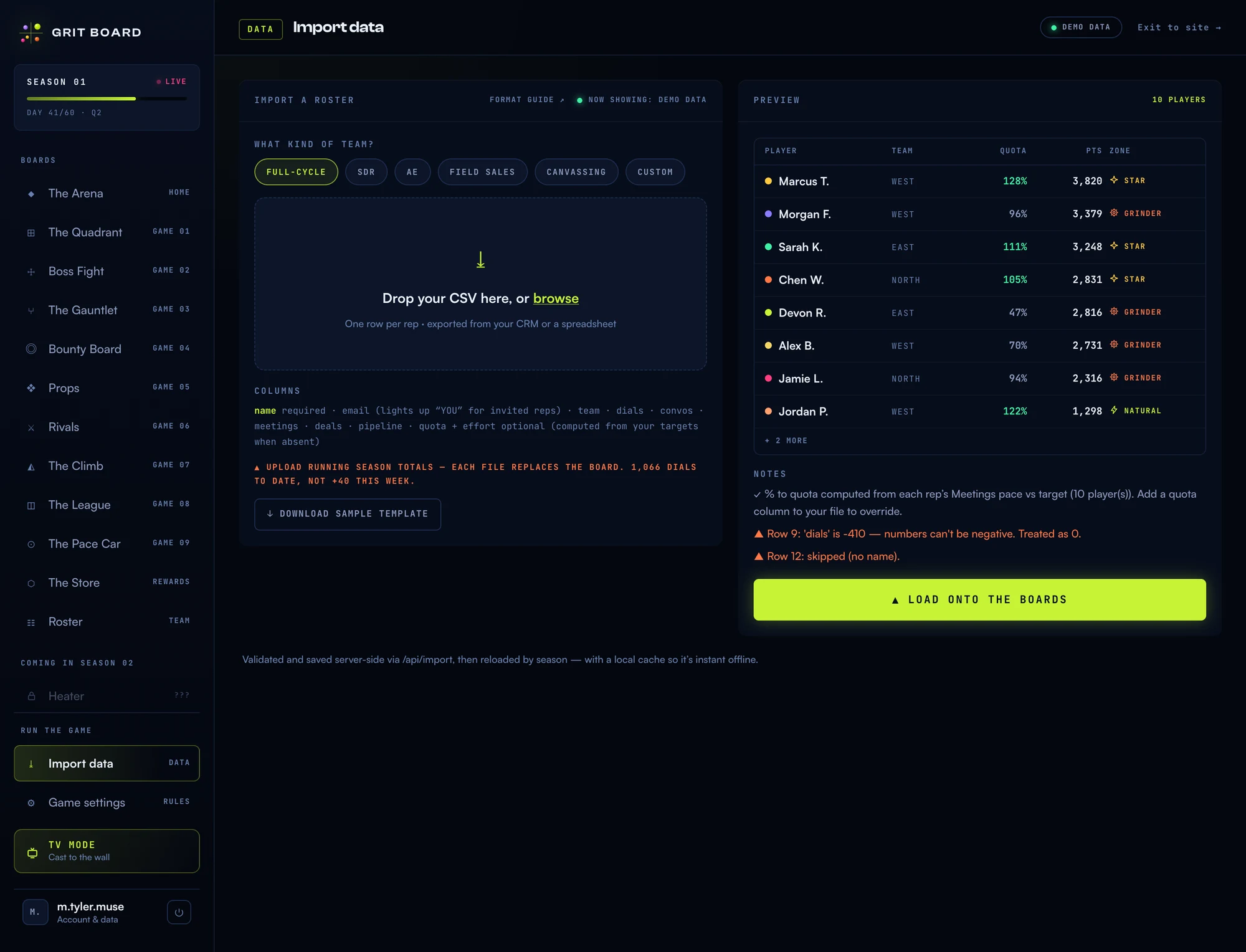
Drop the file (or browse), review the parsed preview and any notes, then hit Load onto the boards. Nothing lands until that button — a bad file can never half-import.
02The columns
- name · REQUIRED The rep’s display name. Also answers to: rep, player, rep name, full name.
- email · recommended Work email. Lights up the YOU highlight for signed-in reps and keeps a rep’s identity (and Grit Coin wallet) stable across uploads. Also: e-mail, work email, email address.
- team · optional Squad/region grouping for team filters. Also: group, region, pod, squad. Missing = "Team".
- your 5 metrics · optional One column per metric, in your own vocabulary — renamed metrics from Game settings are recognized, plus generic spellings: calls, conversations, connects, meets, mtgs, demos, wins, closed won, pipe, revenue, amount…
- quota · optional Explicit % to quota. When present it always wins. Also: attainment, quota %, % quota, % to quota.
- effort · optional Explicit effort score (0–150). Most teams omit it and let the board compute goal-based effort from targets. Also: activity score, effort score.
Only name is required — a missing metric column simply counts as zero. The fastest start: hit Download sample template on the import screen. It generates a file in your team type’s own vocabulary, so what you download is exactly what your CRM export should look like.
03The one rule: running totals
Each upload carries season totals to date — not this week’s delta. If Marcus has made 1,066 dials this season, his dials cell says 1,066, not the +40 he added since the last upload. Each file replaces the board wholesale, so the numbers are always exactly what your last file said.
This is what makes the import stress-free: there’s no sync state to corrupt, no double-counting, and a bad upload is fixed by uploading a corrected file. Upload as often as you like — daily keeps the boards hot, weekly works fine.
One habit worth keeping: always include the email column. Email is how a rep’s identity survives across uploads — it keeps their YOU highlight, earned unlocks, and Grit Coin wallet attached to them even if the row order or name spelling changes between exports.
04Reading the preview
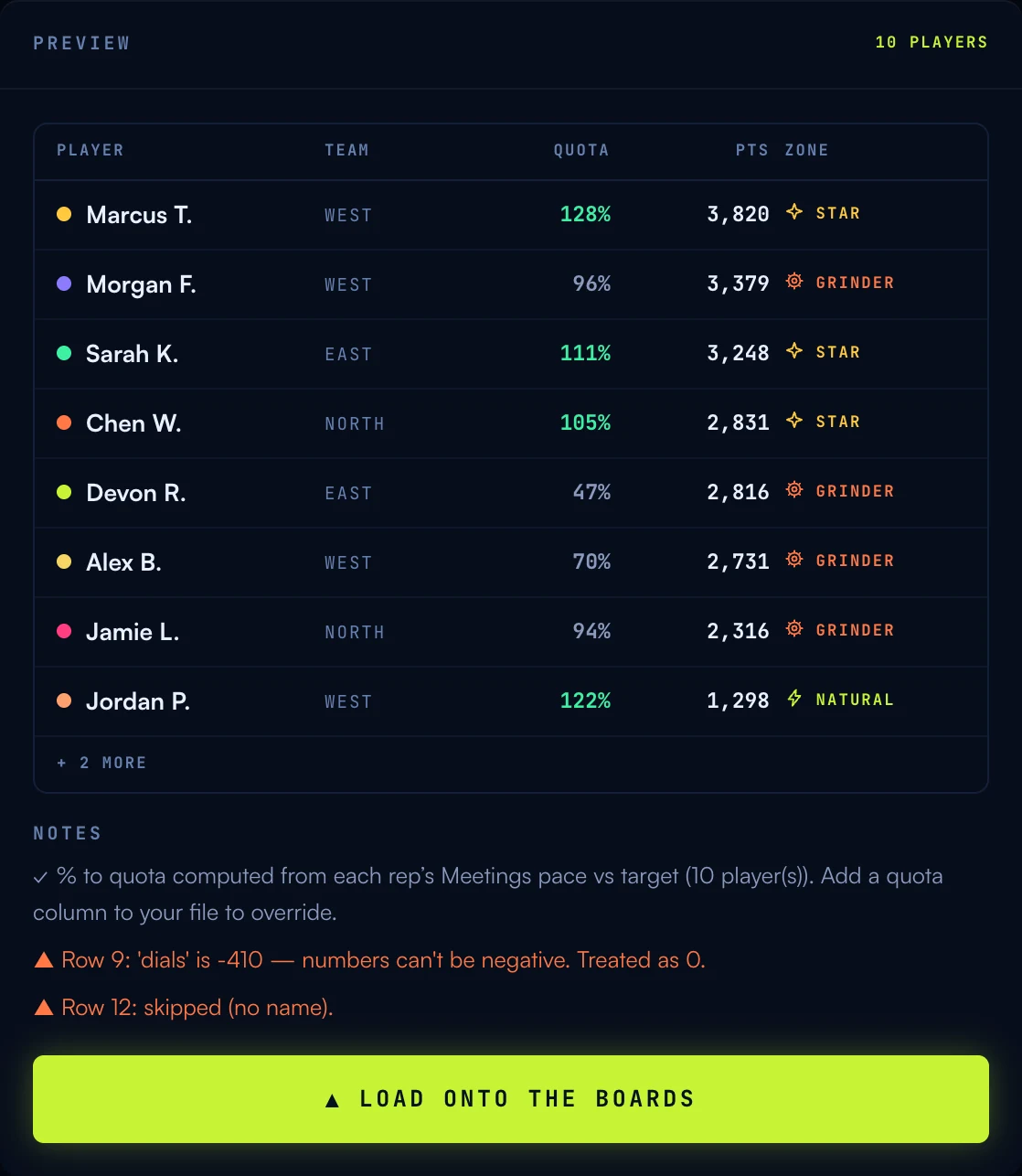
The preview shows every parsed rep with their quota, points, and Quadrant zone — check it against your spreadsheet before loading. Notes come in two voices, on purpose: ✓ calm notes are the engine working for you (“% to quota computed from each rep’s Meetings pace”), while ▲ orange warnings mean something in the file needs your attention, named down to the row and column.
05Every error, with the fix
These stop the import — nothing lands until they’re resolved:
- “The file needs a header row and at least one player row.” The file is empty or headers-only. Export again with at least one rep under the header line.
- “Couldn’t find a "name" column. Include a column named name (or rep / player).” Rename your rep-name column to one of the accepted spellings — name, rep, player, rep name, or full name.
- “No valid player rows found.” Every row was missing a name. Check that the name column actually has values in it.
- “The upload was empty.” The file arrived with no content — re-save the CSV and try again.
- “That file is too large for a roster (max 1 MB).” A roster CSV is tiny; a file this big is usually a raw activity log. Export per-rep totals instead — one row per rep.
- “Only the account owner can upload data. Ask your manager to run the import.” Imports are owner-only by design. Send the file to whoever runs your Grit Board.
- “Your <plan> plan covers N players — this file has M. Upgrade or trim the file.” The file exceeds your plan’s player cap. Nothing was imported — Grit Board never silently truncates a roster.
And the warnings — the file imported, but something is worth knowing:
- ▲ “Row 12: skipped (no name).” That row had no name, so it was left out. The rest of the file imported normally.
- ▲ “Row 9: ‘dials’ is -410 — numbers can’t be negative. Treated as 0.” Activity can’t be negative; the cell was clamped to 0 and named so you can fix the source.
- ▲ “N player(s) had no quota to show — … Defaulted to 100%.” No quota column and nothing to derive one from. Add a quota column, or a column for your quota metric with a target set.
- ▲ “Team median effort is N — your weekly activity targets may be set too high/low.” The whole team piling into one zone usually means the targets are mis-set, not the reps. Tune them in Game settings.
- ▲ “Fewer than 4 players — The Gauntlet needs at least 4 to seed a bracket…” Everything else works; the bracket game waits until the roster is big enough.
06Common questions
“My CRM exports different column names.” Rename nothing — the importer recognizes your Game-settings vocabulary plus the common spellings (calls, demos, mtgs, closed won, revenue…). If a column truly isn’t recognized, rename just that header to match your metric’s name in Grit Board.
“Where do quota and effort come from if I don’t include them?” Quota derives from each rep’s pace on your quota metric versus its target; effort derives from your activity targets (see the Quadrant doc for that math). Explicit columns always override the derivation.
“I uploaded the wrong file.” Upload the right one — each file replaces the board completely, so a correction is one upload away.
More questions? Write to hello@gritboard.io — a human reads it.