How scoring works
Every number on every board comes off the same points engine, and it’s built to survive the question “why is my score what it is?” without a shrug. This page is the whole answer: how a point gets priced, why volume stops paying past a certain point, how the effort score is built, and why your Grit Coin balance is a completely different number from your PTS.
01Three things worth knowing up front
- Every point has a receipt. Click any player anywhere and the card shows exactly which metric earned what — the same math the season used to credit it, never a re-guess.
- Volume plateaus. Running far past your pace on one metric stops paying full value, on purpose — nobody can out-farm the leaderboard by hammering the cheapest thing to log.
- Points and Grit Coin are not the same economy. PTS ranks the season; GC is a separate wallet with its own earn rules. Tuning one can never distort the other.
02Every point has a receipt
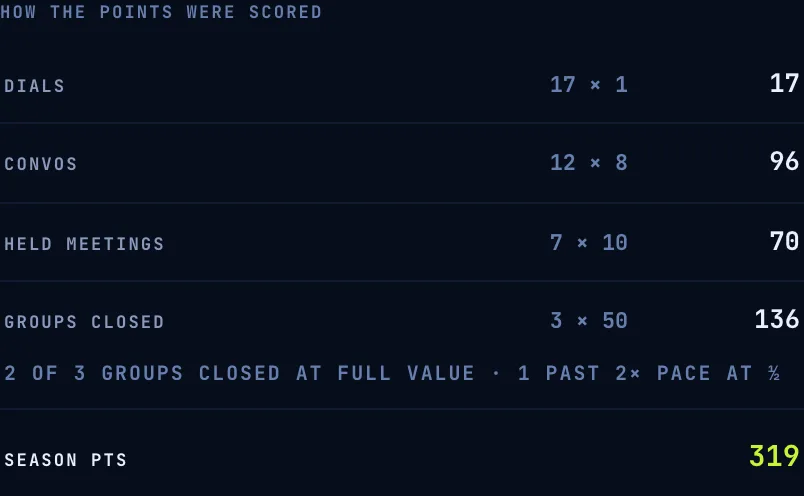
Click a player on any board and the card opens to a full breakdown: one line per metric, in the org’s own words — CONVOS 12 × 8 = 96 — and the lines always sum to the season total on the leaderboard. There’s no separate “explain my score” model running in the background; the receipt is built from the exact same computation that credited the points, so what’s displayed and what’s credited can never quietly drift apart.
When the plateau below has bitten, the row says so in the rep’s own numbers — 2 OF 3 GROUPS CLOSED AT FULL VALUE · 1 PAST 2× PACE AT ½ — instead of a lower total with no explanation attached to it.
03The plateau: volume pays until the pace is beaten
Every scored activity metric compares what a rep logged against their pace — season-to-date, the same clock the Quadrant reads. Units are paid in three bands:
The point of the plateau: without it, the cheapest metric to fake — dials over real conversations, activity logs over held meetings — would be the fastest way to the top of the board. The plateau is a fixed rule built into the scoring engine, not a setting; it costs a manager nothing to configure and it’s always visible in the receipt, never a silent cap.
One honest wrinkle: “2× pace” is measured against the season so far, not a fixed weekly number. A rep who front-loads a huge week early in the season has a higher bar to clear before the plateau kicks in than one who does the same volume in week 10 — because the season-to-date pace itself has climbed by then.
04Effort: a score the manager composes, not a fixed formula
The Quadrant’s horizontal axis — effort — is built from whichever activity metrics your manager is tracking, weighted by an Effort % your manager sets per metric in Game settings → Metrics. Those percentages must sum to 100 across the metrics that are live; the table won’t let you save a set that doesn’t. 100 means on pace on everything weighted the way you said it should count; 150 is the cap, so one huge metric still can’t carry the whole score.
Two rules keep the axis honest: whichever metric is your quota is automatically excluded from effort (it’s the result, not the input), and a metric with no points and no pace simply isn’t “live” — it can’t take a share of the 100%.
If every activity metric ends up benched, unpaced, or serving as the quota, there’s nothing left to measure — the Quadrant shows an explicit EFFORT PAUSED state instead of quietly reading everyone as 0, which would be a false claim about the whole team coasting. Quota and points are unaffected; only the horizontal axis goes quiet until a metric has both a pace and a percentage.
05Pricing the board: PRICE FROM PACES
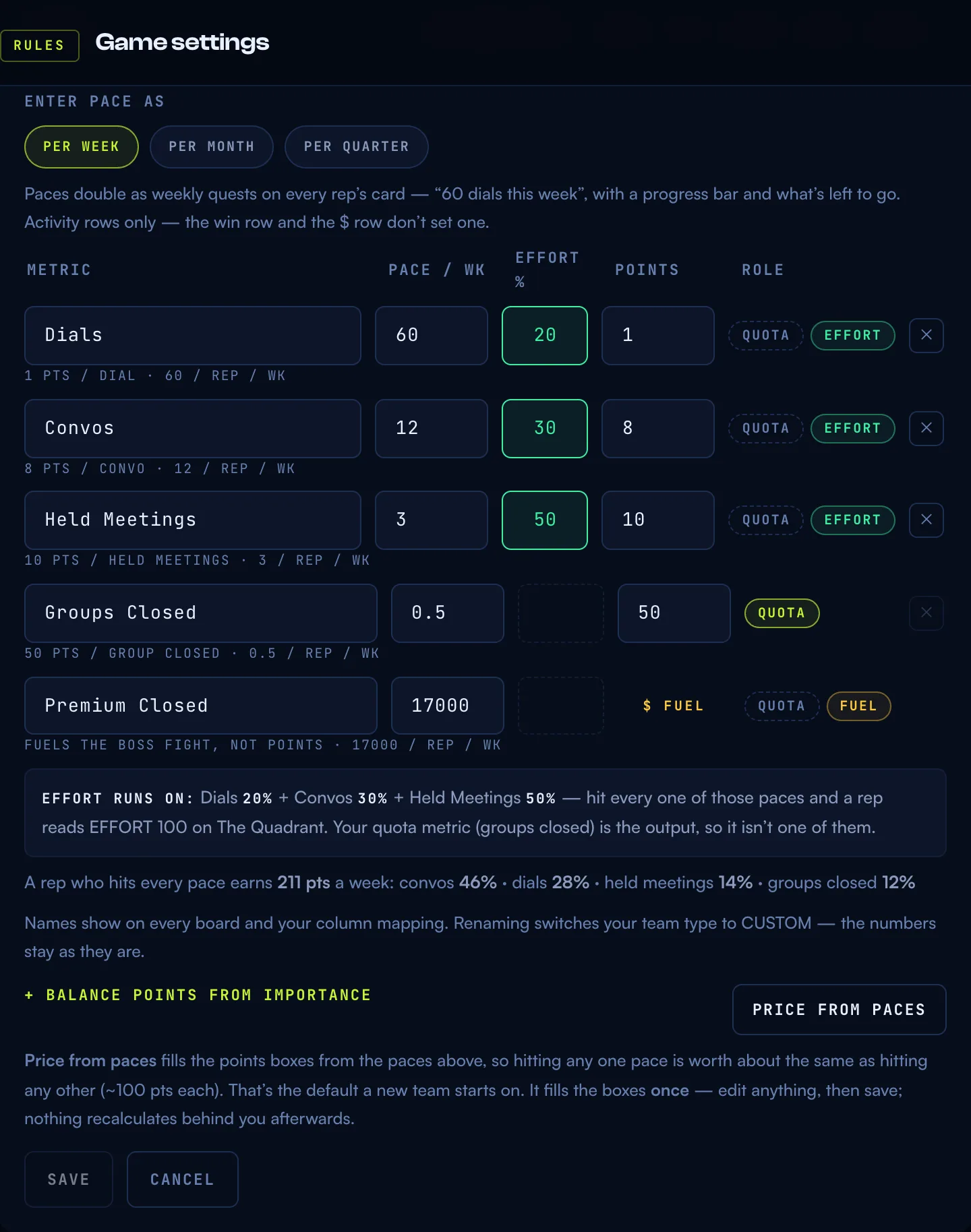
Picking points cold is the question no sales manager can answer (“how many points is a dial worth?”). So a brand-new org’s first season is priced automatically: at pace, every scored metric pays about the same — 100 points a week, the product’s fixed constant — so a balanced week scores balanced points and no single column is the obvious thing to grind. A metric with a lighter weekly pace prices higher per unit than one with a heavy pace; that’s the whole rule.
For an org that already has its own weights, nothing moves on its own — a manager’s hand-picked points are never silently repriced. The Metrics table has a PRICE FROM PACES button that fills the points boxes as an ordinary draft, behind the same armed confirm and rank-diff preview every points change gets, so you see exactly what would shift before anything saves.
Prefer to think in shares of a week instead of raw numbers? Balance points from importance is the other one-shot helper: say what percentage of a normal week each metric should be worth, and the table prices the points for you once — they stay yours to edit afterward. Neither helper is a live formula; points remain the one stored truth, always hand-editable, and nothing recomputes behind your back.
06Weekly quests: this week’s goal, not a percentage
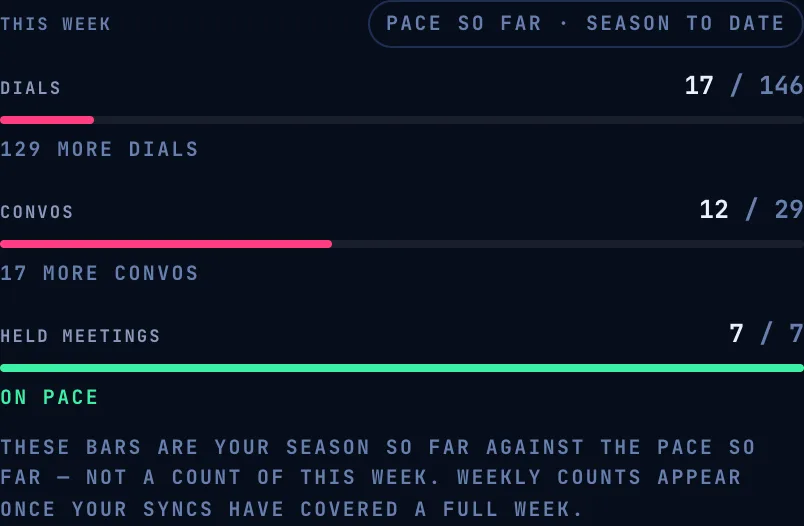
Every rep’s card has a THIS WEEK block — one bar per paced activity metric, restating the pace your manager already set as a goal for the week. The line under the bar always says what’s left in real units (“2 more demos”), never a percentage — proximity to a concrete number moves people; a completion percentage doesn’t.
Every bar carries one of two honest tags, and they mean different things:
- Measured The trailing seven days are fully covered by real day-by-day captures, so the bar is a true weekly count.
- Pace so far They aren’t yet, so the bar falls back to season totals against the season-to-date pace — the Quadrant’s own arithmetic, labelled as exactly that. This is where every card sits until an org has accrued a full week of captured history.
Holding a bar at full pace for a week lines up with that week’s Grit Coin target bonus — but the mint judges the bonus on the prorated sync window, not on this bar or a calendar week, so the card never claims that finishing the bar mints an exact number right now.
07Why points and Grit Coin are separate
PTS ranks the season — zero-sum, someone’s first, someone’s last, and it resets on the season’s cadence. Grit Coin is a personal wallet that never resets and nobody can take from you. They’re kept as two one-way flows on purpose: activity → points and activity → coin are computed by completely separate rules, so tuning the scoring table for game feel can never blow the prize budget, and tuning the coin economy for prizes can never distort the standings. Spending coin never touches your rank — see the Store & Grit Coin for how the wallet itself works.
08Common questions
“My receipt total doesn’t match my leaderboard points.” That means the board is showing a season that was scored on older settings than the one it just loaded — reload the page. The receipt says so directly rather than printing lines that silently don’t add up.
“Did the plateau just cost me points, or am I being penalized?” Neither, in the sense of a penalty — it’s the anti-spam rule doing its job. Running past 2× your pace on one metric is real work, and it still pays half; it just isn’t worth double, because nothing should be worth infinitely more the harder you spam it.
“Why is my effort score 0 (or paused)?” Either every activity metric is currently benched, unpaced, or serving as your quota — check the Quadrant guide for the full effort-axis rules, or ask your manager to check Metrics in Game settings.
More questions? Write to hello@gritboard.io — a human reads it. See also the Quadrant guide and the Store & Grit Coin.