The Season report
Every other board answers “what’s happening right now?” The Season report answers a different question — can I trust the number I’m about to quote in a team meeting? It’s an owner-only page (sidebar → Run the game → Season report) built around one rule: every section wears a badge saying exactly how solid its numbers are, and nothing is ever presented as more certain than it is.
01Reading the badges
Before anything else, learn the three words that appear on every section. They are never colour alone — the word is the badge, colour only reinforces it:
- Measured Backed by data this org actually recorded, day by day.
- Estimated The numbers themselves are real, but their shape over time is season-to-date, not recorded one day at a time — a synthesized spread, not an invented total.
- No history yet Nothing has been recorded for this section yet. This is an empty state, not a zero.
A brand-new org, or an org that adopted Grit Board mid-season, will see mostly No history yet and Estimated at first. That’s not a bug or a missing setup step — real day-by-day history only starts accruing from the moment an org’s first import or CRM sync lands after this feature shipped. Your boards are still correct in the meantime; this page just can’t yet say what happened inside a given week.
02Points economy
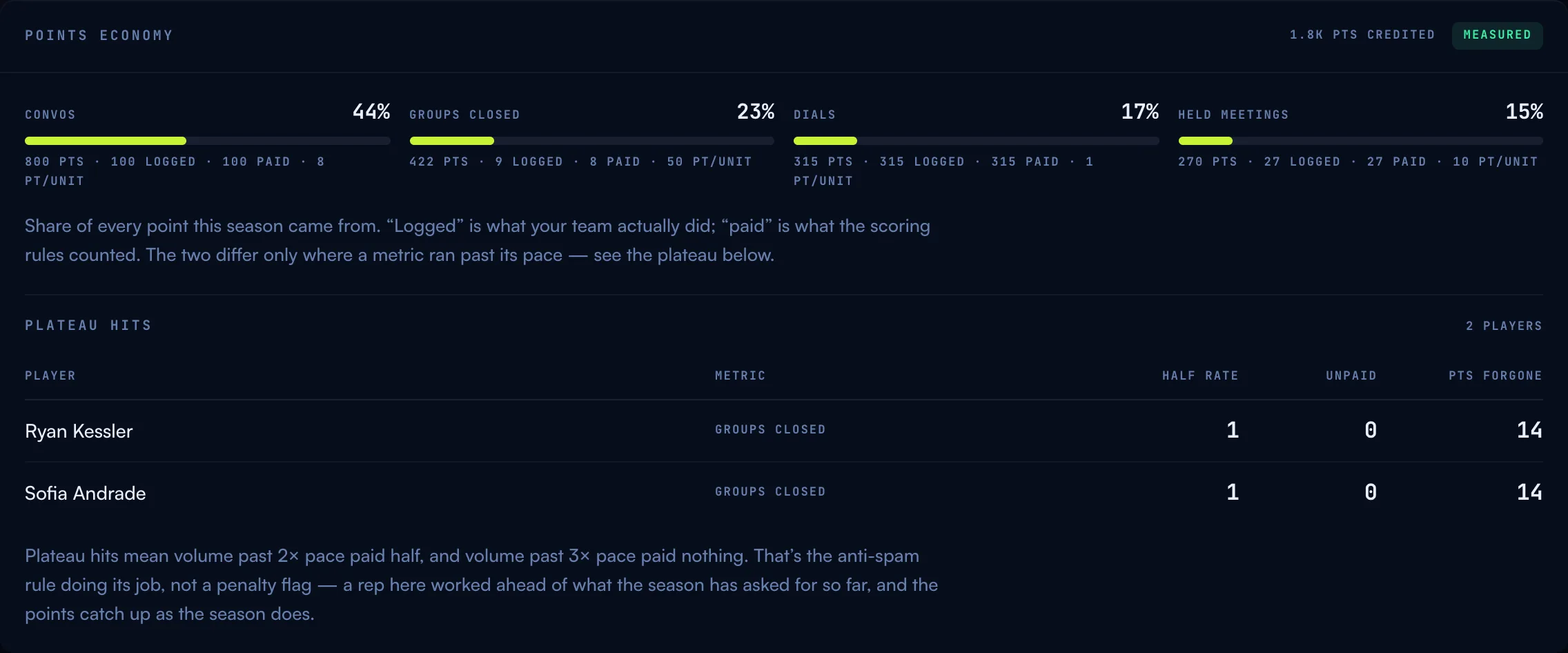
Where every point this season actually came from: each scored metric’s share of the total, plus how many units were logged (what the team really did) versus paid (what the scoring rules counted) — the two only differ where a metric ran past its pace. Below that, a plateau hits table names every player and metric where the pace plateau took effect, with the points forgone. This is a fairness readout, not a cheating flag: it means a rep worked ahead of what the season has asked for so far. See how scoring works for the plateau rule itself.
03Grit Coin economy
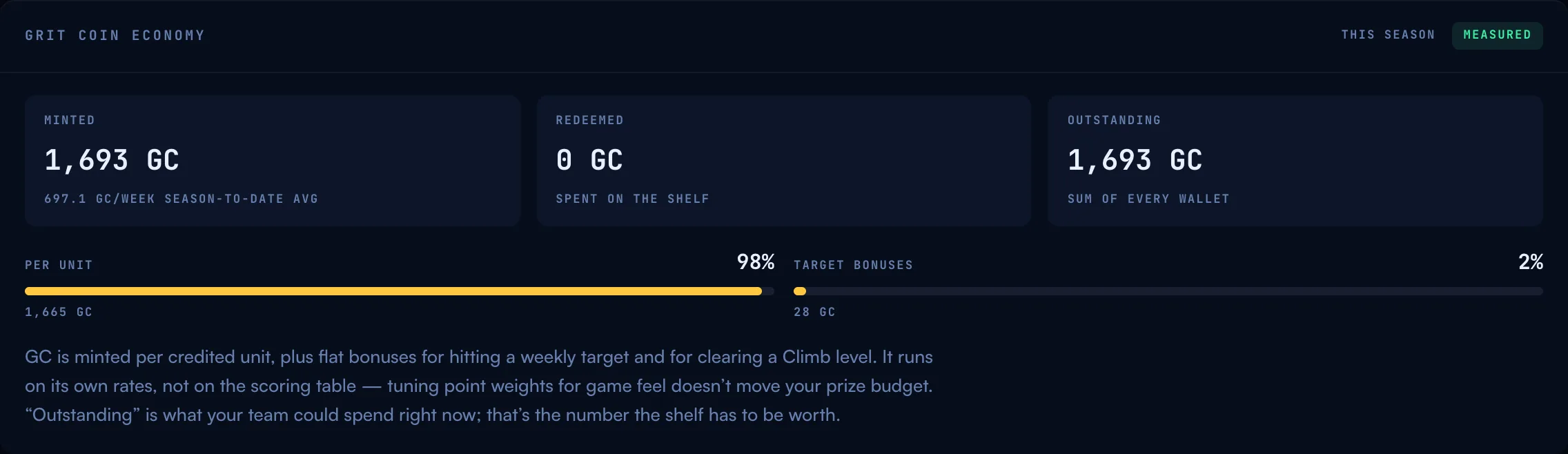
What the mint has actually printed and what’s been spent: minted, redeemed, and outstanding — the sum of every wallet, which is what your reward shelf has to be worth right now. The breakdown below shows where the minted coin came from (per-unit activity, weekly target bonuses, Climb level-ups). Because coin runs on its own rates rather than the scoring table (see the Store & Grit Coin), tuning point weights for game feel never moves this number.
04Sync health

Is the season being measured, or just totalled? This section shows the last capture, how many days of the season so far actually have a dated recording, and the longest gap between two captures. A day is “recorded” when an import or CRM sync ran that day — gaps aren’t missing work (the totals still landed), they just mean a stretch got measured as one lump, so nothing can honestly claim what happened inside it. Sync more often and every week-shaped number across the product — quests, the sync recap, this report — stops being an estimate and starts being real.
05Worth a look
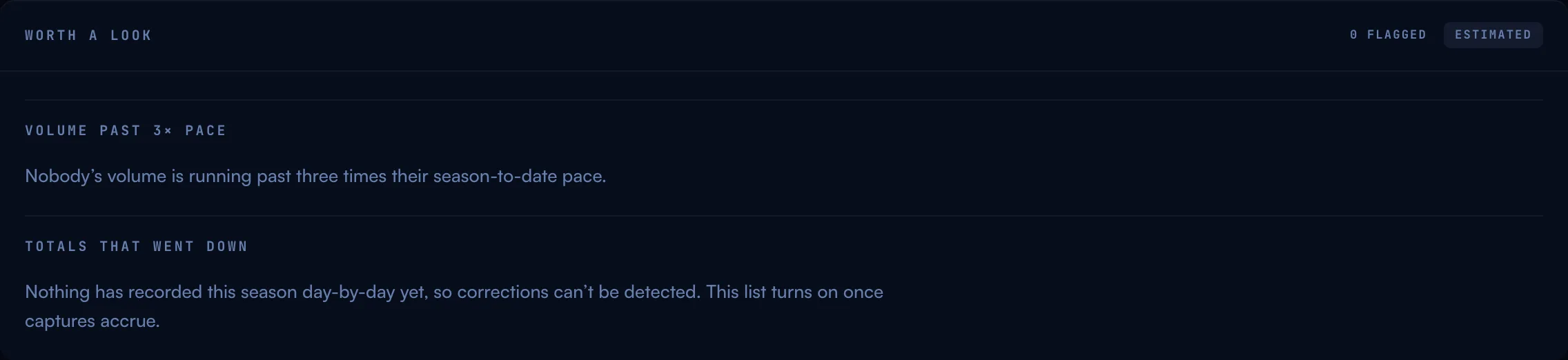
Two informational flags, deliberately worded to send a manager to the data, not to a rep’s desk. Volume past 3× pace lists anyone running triple their season-to-date pace on a metric — usually a target set too low, a CSV column double-counting, or a genuinely huge week. Totals that went down lists any measured total that dropped since a prior capture — a deal reopened, a duplicate cleaned up, a CRM field re-mapped. Either way, the span in question scores zero points rather than negative ones, and the surrounding days keep their own numbers untouched.
06What changes once history is measured
Nothing about this page requires any setup — it’s reading the same history every other surface already draws on (the sync recap on the Arena, the weekly quest bars, the Season Log). As your org’s imports and CRM syncs accrue day-by-day captures:
- Badges upgrade on their own. A section moves from No history yet → Estimated → Measured per dataset, never all at once and never early — a number is only called Measured once the window it describes is fully covered by real captures.
- Plateau hits and pace flags get sharper. They already run on real totals; what improves is the sync-health picture backing them and the granularity of the mint-per-week readout.
- Corrections start showing up. The “totals that went down” list can only detect a drop between two dated captures — it’s empty (and says so) until there’s more than one measurement to compare.
07Common questions
“Why does my report say NO HISTORY YET everywhere?” Real day-by-day history starts from your next import or CRM sync — nothing before that point was recorded per-day, only as running season totals. Your boards are still correct; this page just can’t break a week down yet.
“Is a plateau hit something I should raise with a rep?” No — it means they ran ahead of the pace the season expects, and the points caught up as the season does. It’s the anti-spam rule working, not a performance flag.
“A total went down — is that a bug?” Almost always something changed on the CRM side (a deal reopened, a duplicate merged). The report treats the drop as worth zero points for that span, never negative ones.
More questions? Write to hello@gritboard.io — a human reads it. See also how scoring works and the Arena.